Why Industrial Automation Components Fail
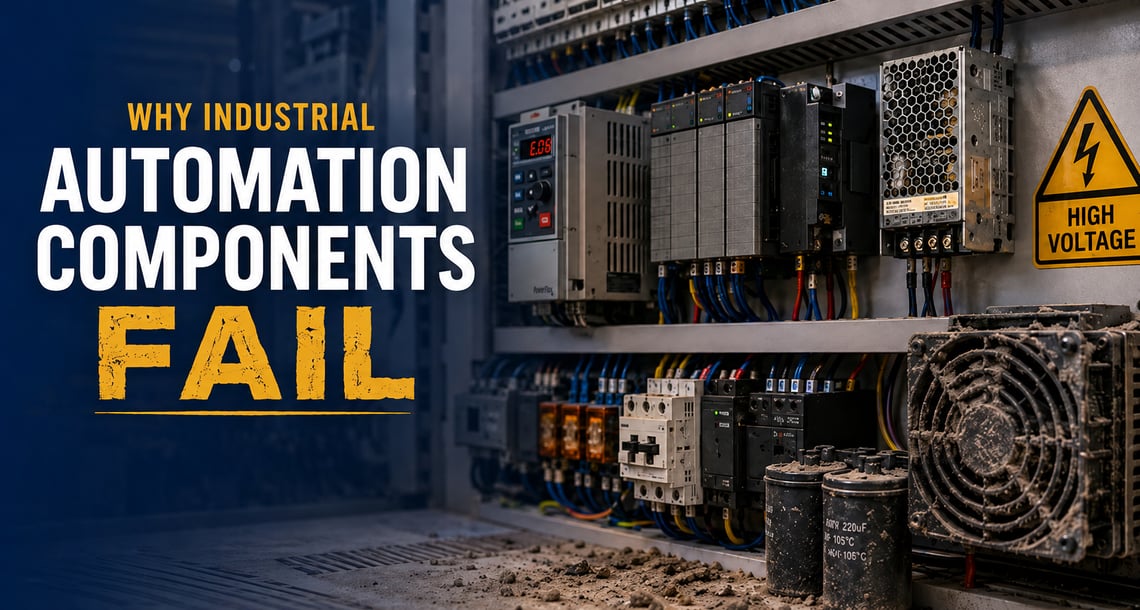
Industrial automation systems keep production moving, but one failed Programmable Logic Controller (PLC) module, variable frequency drive (VFD), sensor, relay, power supply, or HMI can stop a line quickly. For maintenance managers, reliability engineers, and plant teams, knowing why components fail can speed up troubleshooting, reduce repeat downtime, and support better spare parts planning.
What Causes Industrial Automation Component Failures?
Industrial automation components most often fail because of heat, moisture, dust and contaminants, power quality problems, vibration, aging parts, or installation and configuration errors. These stresses can damage PLCs, drives, sensors, relays, contactors, power supplies, HMIs, and other control components gradually or suddenly, depending on the operating environment.
Excess Heat Inside Control Cabinets
Heat is one of the most damaging stresses for industrial electronics. PLCs, VFDs, HMIs, power supplies, and communication modules are rated for specific temperature ranges. When cabinet temperatures exceed those ratings, internal parts degrade faster.
Heat can dry out electrolytic capacitors, weaken semiconductor components, damage insulation, wear out cooling fans, and fatigue solder joints. Warning signs may include overtemperature faults, nuisance drive trips, discolored terminals, failed fans, or components that fail during peak production or warmer months.
To reduce risk, monitor enclosure temperature, keep vents and filters clean, and consider thermal management products such as fans, filters, air conditioners, or heat exchangers when cabinet temperatures run high.
Moisture, Humidity, and Condensation
Moisture-related damage is often slow and difficult to detect. Humidity and condensation can corrode terminals, connectors, and circuit boards, reduce insulation resistance, and create intermittent faults that disappear during inspection.
Condensation commonly occurs when warm, humid air enters a cooler enclosure. Facilities exposed to washdown, temperature swings, or frequent startup and shutdown cycles are especially vulnerable. Sensors, low-voltage signal circuits, and measurement devices are often the first components affected.
Proper enclosure sealing, humidity control, enclosure heaters, and pressure compensation can help protect equipment in moisture-prone applications.
Dust, Dirt, Oil Mist, and Airborne Contaminants
Dust and airborne contaminants can block airflow, coat heat sinks, clog fan filters, and cause components to run hotter. In harsh environments, oil mist, metallic particles, chemical vapors, or conductive dust can corrode contacts and create electrical paths that cause shorts or intermittent faults.
Regular enclosure cleaning and filter replacement are simple but important preventive steps. For severe environments, confirm that the enclosure’s NEMA or IP rating matches the level of dust, moisture, washdown, or chemical exposure in the area.
Power Quality Problems
Unstable power can damage automation equipment immediately or shorten its life over time. Power surges, voltage sags, brief interruptions, harmonic distortion, overvoltage, and undervoltage can cause VFD faults, PLC resets, communication loss, or power supply failure.
Different devices address different problems. Surge protective devices help reduce transient voltage damage. UPS systems can protect control equipment from short interruptions. Line reactors may help protect drives from certain incoming power disturbances.
When troubleshooting repeat failures, review fault logs, incoming power measurements, load conditions, and grounding before replacing the component.
Vibration and Mechanical Stress
Heavy machinery, conveyors, pumps, compressors, and motors can transmit vibration into panels and control equipment. Over time, vibration can loosen terminals, damage cable terminations, fatigue solder joints, and accelerate wear on relays, contactors, and cooling fans.
Loose wiring is a common cause of intermittent faults. Inspect terminals, connectors, and cable supports regularly, and re-torque connections to manufacturer specifications where required.
Aging Components and Obsolete Parts
Even under good operating conditions, electronic components age. Capacitors dry out, relay contacts wear, fan bearings fail, displays dim, and power supplies can drift or fail under load.
Aging failures are especially common in facilities running legacy systems. When an OEM discontinues a part, replacement planning becomes more difficult. Maintain current backups of PLC programs, HMI applications, VFD parameters, firmware versions, and part numbers so replacement and commissioning work can move faster.
Installation, Wiring, and Configuration Issues
Not every automation problem begins with a bad component. Incorrect wiring, improper replacement parts, misconfigured parameters, mismatched firmware, poor documentation, or cables routed near high-power conductors can all cause unreliable operation.
Before replacing a suspected failed part, check wiring, control voltage, grounding, firmware compatibility, PLC scaling, drive parameters, and replacement part compatibility.
Which Components Fail Most Often?
Some automation components are more vulnerable because they handle heat, switching, power conversion, mechanical use, or direct process exposure.
- VFDs and drives: Common issues include capacitor aging, cooling fan failure, overtemperature, overcurrent, overvoltage, and load-related stress.
- PLC modules: Power issues, communication loss, I/O failure, wiring problems, and firmware mismatches can cause faults or unexpected STOP mode.
- Relays and contactors: Contacts wear from switching and arcing. Coils, terminals, and mechanical parts can also fail over time.
- Sensors: Proximity sensors, photoelectric sensors, pressure transmitters, and temperature sensors can drift, corrode, become contaminated, or fail because of cable damage.
- Power supplies: Capacitor aging, overload, heat, unstable input power, and poor ventilation are common failure causes.
- HMIs: Touchscreens, displays, communication ports, and power inputs can fail from age, contamination, or frequent use.
How to Extend Automation Component Life
A proactive maintenance plan can prevent many failures. Inspect control cabinets during peak production, when heat and load are highest. Replace filters on a schedule. Clean vents, fans, and heat sinks. Check terminals for looseness, corrosion, or discoloration. Review VFD fault history. Test incoming power for sags, surges, harmonics, and brief interruptions.
It is also important to keep critical spares for PLC power supplies, I/O cards, VFDs, HMIs, relays, sensors, and control power supplies. Document part numbers, configuration files, firmware versions, and application backups so the team can respond quickly when a component fails.
Finding the Right Replacement Component
When a component fails, recovery depends on identifying the right replacement quickly. Galco can help maintenance teams source automation components, identify compatible alternatives, locate hard-to-find or obsolete parts, and access repair services for select industrial electronics.
Need help replacing a failed automation component? Contact us or call Galco at 800-575-5562 to speak with the team.
FAQs About Automation Component Failures
What is the most common cause of automation component failure?
Heat is one of the most common causes. High temperatures accelerate capacitor aging, semiconductor stress, insulation breakdown, fan failure, and other problems.
How do power problems affect PLCs and drives?
Surges, voltage sags, interruptions, and harmonics can damage power supplies, reset PLCs, fault drives, or disrupt communication modules.
Why do VFDs fail?
VFDs commonly fail because of capacitor aging, failed cooling fans, overtemperature, unstable power, motor/load issues, or aggressive drive settings.
How can I prevent repeat component failures?
Look beyond the failed part. Check heat, airflow, moisture, contamination, vibration, power quality, wiring, grounding, firmware, and configuration before restarting the system.